
Skip to content

Reality Industries LLC

Windows and Linux System Administration

  • Reality Industries
    • Login
  • Tech Stuff
    • Tech News
    • Linux Cheatsheet
    • Recipes and Howtos
      • Add Debian box to Active Directory
      • Configure automatic mounting of SMB shares using CIFS and fstab on Debian 12
      • Install SQL Server 2022 on Debian 12
      • Quick and Dirty Recipe for GPU Pass through, KVM, Debian 12
      • Create a RAID Array with mdadm
      • Build a Network Bridge, then Get Over It.
    • The Jargon File
    • Windows Cheatsheet
  • Other Stuff
    • Stuff going on worldwide
    • Stuff going on in Canada
    • Stuff going on in the Maritimes
    • Funny Stuff
    • Various Services and Stuff
    • Interesting Stuff
  • About
    • About Me
    • Privacy Policy
    • Reality Systems
    • Contact Us

So this is how you build a network bridge, configured to use DHCP, using network manager.

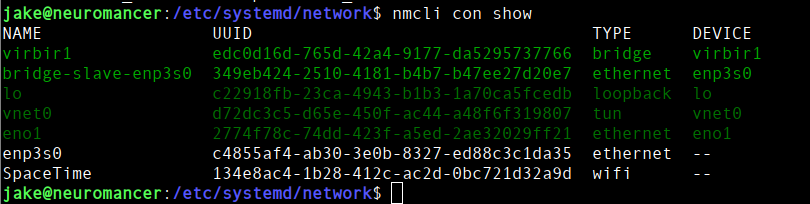
nmcli con show This lists all available connections. I used it to identify the physical connection enps30
nmcli con add ifname <bridge name> type bridge con-name <bridge name> This command adds a new connection, type bridge, with name <bridge name>

You then use nmcli con add type bridge-slave ifname <connection name> master <bridge name> to add the physical connection <connection name> to the bridge <bridge name>

nmcli con mod <bridge name> bridge.stp no Turns off STP. Don’t ask questions

nmcli con down <connection name> Takes down <connection name>,but can be any physical or logical network connection.

nmcli con up <bridge name> brings up <bridge name>, but can be any physical or logical network connection.

Copyright 2025, all rights reserved, except for when they are not.