
1. Edit Grub and enable VT-d or AMD IOMMU extensions in the bios, then edit grub, and add the following:
sudo nano /etc/default/grub
Edit the GRUB_CMDLINE_LINUX="" line to read GRUB_CMDLINE_LINUX="intel_iommu=on iommu=pt", when finished, save the file and run update-grub, if you’re confused, that updates the grub menu.
2. Grab the PCI ID# and the Vendor ID# from the system using lspci:
lspci -nn | grep -i AMD
02:00.0 VGA compatible controller [0300]: Advanced Micro Devices, Inc. [AMD/ATI] Caicos [Radeon HD 6450/7450/8450 / R5 230 OEM] [1002:6779]
02:00.1 Audio device [0403]: Advanced Micro Devices, Inc. [AMD/ATI] Caicos HDMI Audio [Radeon HD 6450 / 7450/8450/8490 OEM / R5 230/235/235X OEM] [1002:a...
04:00.0 VGA compatible controller [0300]: Advanced Micro Devices, Inc. [AMD/ATI] Polaris 20 XL [Radeon RX 580 2048SP] [1002:6fdf] (rev ef)
04:00.1 Audio device [0403]: Advanced Micro Devices, Inc. [AMD/ATI] Ellesmere HDMI Audio [Radeon RX 470/480 / 570/580/590] [1002:aaf0]
I’m using that ancient Radeon HD 6450 for video out (it’s all it’s good for) and the RX 580 is our target card. I am going to pass HDMI audio through too so if you are doing the same, take note of the 2 CSV at the end of the line. This is the PCI # and the Vendor ID#. In my case, it’s 1002:6fdf and 1002:aaf0
3. Run sudo nano /etc/modprobe.d/vfio.conf and add the following line. Use the 2 sets of IDs that you gathered in the last step.
options vfio-pci ids=10de:1184,10de:0e0a
save and exit that file.
4. Su to root, and run the following command. This tells the system to load the iommu modules.
Su -
echo 'vfio-pci' > /etc/modules-load.d/vfio-pci.conf
5. Reboot!
6. confirm that IOMMU is enabled and working. A bunch of crap will appear on your screen. the really important line is “DMAR: Intel(R) Virtualization Technology for Directed I/O”
sudo dmesg | grep -E "DMAR|IOMMU"
[ 0.010307] ACPI: DMAR 0x000000003A827CA8 0000E4 (v01 ALASKA A M I 00000001 INTL 20091013)
[ 0.010326] ACPI: Reserving DMAR table memory at [mem 0x3a827ca8-0x3a827d8b]
[ 0.020005] DMAR: IOMMU enabled
[ 0.127166] DMAR: Host address width 46
[ 0.127167] DMAR: DRHD base: 0x000000fbffd000 flags: 0x0
[ 0.127174] DMAR: dmar0: reg_base_addr fbffd000 ver 1:0 cap 8d2008c10ef0466 ecap f0205b
[ 0.127176] DMAR: DRHD base: 0x000000fbffc000 flags: 0x1
[ 0.127180] DMAR: dmar1: reg_base_addr fbffc000 ver 1:0 cap 8d2078c106f0466 ecap f020df
[ 0.127182] DMAR: RMRR base: 0x0000003b430000 end: 0x0000003b43ffff
[ 0.127183] DMAR: ATSR flags: 0x0
[ 0.127184] DMAR: RHSA base: 0x000000fbffc000 proximity domain: 0x0
[ 0.127187] DMAR-IR: IOAPIC id 1 under DRHD base 0xfbffc000 IOMMU 1
[ 0.127188] DMAR-IR: IOAPIC id 2 under DRHD base 0xfbffc000 IOMMU 1
[ 0.127189] DMAR-IR: HPET id 0 under DRHD base 0xfbffc000
[ 0.127190] DMAR-IR: x2apic is disabled because BIOS sets x2apic opt out bit.
[ 0.127191] DMAR-IR: Use 'intremap=no_x2apic_optout' to override the BIOS setting.
[ 0.127805] DMAR-IR: Enabled IRQ remapping in xapic mode
[ 0.601834] DMAR: [Firmware Bug]: RMRR entry for device 06:00.0 is broken - applying workaround
[ 0.601837] DMAR: No SATC found
[ 0.601838] DMAR: IOMMU feature sc_support inconsistent
[ 0.601839] DMAR: IOMMU feature dev_iotlb_support inconsistent
[ 0.601840] DMAR: dmar0: Using Queued invalidation
[ 0.601843] DMAR: dmar1: Using Queued invalidation
[ 0.604846] DMAR: Intel(R) Virtualization Technology for Directed I/O
[ 0.910846] AMD-Vi: AMD IOMMUv2 functionality not available on this system - This is not a bug.
I then used virt-manager to pass the virtualized GPU to Dixie, my trusty VM, which after a quick reboot saw the GPU and i made the following changes to the config:
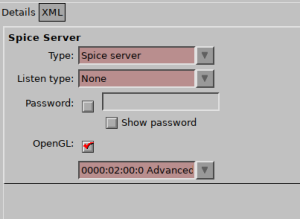
I changed “listen” to “none” on the Display Spice item in the Hardware list on the left of the VMs detail view.
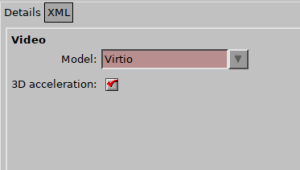
I then checked the checkbox on the Video virtio item, which enables 3d acceleration.
I then rebooted the VM, and was promptly told i could no longer access the VM through virt-manager or Virt-viewer! Success? maybe. I then sshed into the VM and ran lspci -nn | grep -i AMD, which gave me:
08:00.0 VGA compatible controller: Advanced Micro Devices, Inc. [AMD/ATI] Polaris 20 XL [Radeon RX 580 2048SP] (rev ef)
Success!